Network engineers understand protocols. OSPF discovers neighbors. BGP exchanges reachability. HTTP moves data between client and server. Every one of those protocols solved the same fundamental problem: how do two parties discover each other, make requests, and exchange responses in a predictable, interoperable way?
That standardization is what made the internet scale. HTTP gave the web a shared language for requesting and serving documents. BGP gave autonomous systems a shared language for exchanging routing information. In each case, the protocol unlocked an ecosystem that couldn’t have existed without it: anyone could build a client or a server and they’d interoperate out of the box.
The Model Context Protocol (MCP) is that moment arriving for AI. It defines how a language model discovers what tools are available to it, how it requests a tool call, and how results come back. That’s it. A thin, well-specified layer between an LLM and your code. It’s not magic. It’s a protocol.
This post builds a working example: an MCP server that gives an AI agent access to a three-site network running OSPF. By the end, you’ll be able to ask it “are all OSPF adjacencies up across all sites?” and watch it figure out on its own that it needs to query three routers.
Assumed familiarity: This post assumes you’re comfortable with Python, have some exposure to Netmiko or SSH-based network automation, and know what OSPF is. The goal is not to teach EVE-NG, Netmiko, or Python fundamentals. It’s to show how MCP connects an LLM to your existing network tooling.
What Is MCP, Really?
Strip away the AI hype and MCP is a client-server protocol with three core interactions:
- Discovery: the client asks the server what do you have? The server responds with a list of available tools, resources, and prompts.
- Invocation: the client says call this tool with these arguments. The server executes it and returns the result.
- Response: the result comes back in a structured format the client can reason over.
That’s the entire protocol. The “client” here is your LLM (or more precisely, the agent framework wrapping it). The “server” is your code. The LLM reads the tool list at the start of a session, decides which tools to call based on user input, and sends structured requests. Your server executes them against real infrastructure and returns real output.
MCP servers expose three types of primitives, each designed for a different interaction model:
- Tools are model-controlled. The LLM decides when to call them, which arguments to pass, and what to do with the result. Designed for actions and queries with specific parameters.
- Resources are application-controlled. The host client decides when to inject them into the conversation, typically before it starts. Designed for relatively static data: configuration, inventory, documentation.
- Prompts are user-controlled. Reusable templates a user can select in a compatible client, giving quick access to pre-defined queries or workflows.
The distinction matters because it determines who drives the interaction: the model, the client, or the user.
Compare this to how you’d connect a script to network gear today: you write custom SSH handling, hardcode the commands you care about, and parse the output in a one-off way. MCP makes that interface discoverable and composable. Any MCP-compatible client (a Streamlit app, Claude Desktop, or a custom agent) can connect to your server and immediately know what it can do.
The practical implication for network automation is significant. Instead of writing a new script every time an operator has a new question, you expose a small set of primitives (list devices, run command) and let the LLM compose them to answer whatever’s asked.
The Lab
The lab runs in EVE-NG with three Cisco CSR1000v routers connected through a provider network cloud, each with a downstream switch and a Linux host. OSPF runs between all three sites.
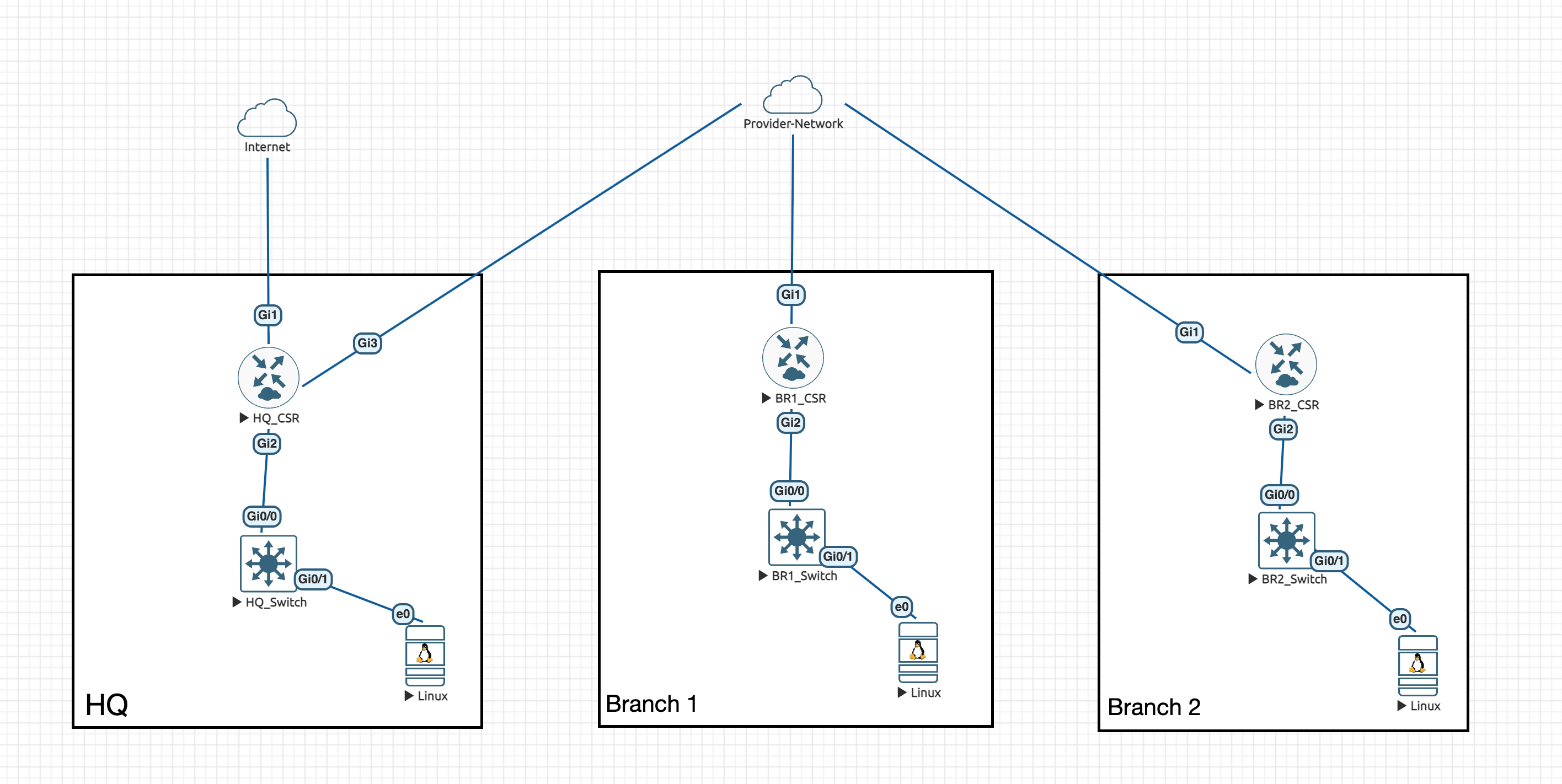
- HQ_CSR
172.20.20.1: uplinks to the internet and provider network, downstream to HQ_Switch - BR1_CSR
172.20.21.1: uplink to provider network, downstream to BR1_Switch - BR2_CSR
172.20.22.1: uplink to provider network, downstream to BR2_Switch
The MCP server and Streamlit client run on a MacBook, outside the EVE-NG topology, reaching the routers via the management network.
Building the MCP Server
The server has two files: a device inventory and the server itself.
inventory.json
Instead of a database, a flat JSON file is enough for a lab. Each entry is a Netmiko connection dictionary; the keys map directly to ConnectHandler parameters.
[
  {
    "host": "172.20.20.1",
    "device_type": "cisco_ios",
    "username": "admin",
    "password": "admin",
    "secret": "admin"
  },
  {
    "host": "172.20.21.1",
    "device_type": "cisco_ios",
    "username": "admin",
    "password": "admin",
    "secret": "admin"
  },
  {
    "host": "172.20.22.1",
    "device_type": "cisco_ios",
    "username": "admin",
    "password": "admin",
    "secret": "admin"
  }
]
server.py
import json
import os
from dotenv import load_dotenv
from mcp.server.fastmcp import FastMCP
from netmiko import ConnectHandler
from pathlib import Path

load_dotenv()

mcp = FastMCP("net-mcp", port=8080)
INVENTORY_FILE = Path(__file__).parent / "inventory.json"


def _load_inventory() -> list[dict]:
    with open(INVENTORY_FILE) as f:
        return json.load(f)


def _get_device(host: str) -> dict | None:
    return next((d for d in _load_inventory() if d["host"] == host), None)


def _run_command(host: str, command: str) -> str:
    device = _get_device(host)
    if not device:
        return f"Device '{host}' not found in inventory."
    with ConnectHandler(**device) as conn:
        return conn.send_command(command)


# Resource: inventory as application-managed context
@mcp.resource("network://inventory")
def get_inventory() -> str:
    """All devices in the network inventory, excluding credentials."""
    devices = [{k: v for k, v in d.items() if k != "password"} for d in _load_inventory()]
    return json.dumps(devices, indent=2)


# Tools: model-driven actions
@mcp.tool()
def list_devices() -> list[dict]:
    """List all devices in the network inventory."""
    return [{k: v for k, v in d.items() if k != "password"} for d in _load_inventory()]


@mcp.tool()
def run_command(host: str, command: str) -> str:
    """Run a show command on a network device. Example: run_command('172.20.20.1', 'show ip route')"""
    return _run_command(host, command)


# Prompt: user-invocable workflow template
@mcp.prompt()
def ospf_audit() -> str:
    """Check OSPF adjacency health across all devices in the inventory."""
    return (
        "Use the inventory to find all devices, then check OSPF neighbors on each one. "
        "Report the adjacency state and DR/BDR role for every neighbor relationship. "
        "Flag anything not in FULL state."
    )


if __name__ == "__main__":
    mcp.run(transport="sse")
All three primitives, one server
The server uses each primitive for what it was designed for.
The resource (network://inventory) exposes the device list as application-managed context. In clients that support resources, the host can inject the inventory into the conversation before the first message, so the LLM already knows what’s in the network without having to ask. The URI scheme (network://) is arbitrary; it’s just a stable identifier the client uses to fetch and cache the data.
The tools are the action layer. run_command gives the LLM reach: it can query any device with any show command and get back real output. list_devices exposes the same inventory data as a tool, because most MCP clients today only support tools. That redundancy is intentional: a fallback for the current state of the ecosystem.
The prompt (ospf_audit) is a reusable workflow template. In a client that surfaces prompts (Claude Desktop does; most others don’t yet), a user can select it from a menu and immediately kick off a structured OSPF health check without writing anything. Prompts are also useful for encoding institutional knowledge: the right questions to ask, in the right order, phrased in a way the model handles reliably.
A note on client support: Resources and prompts are part of the MCP spec, but client support is uneven. The Streamlit client used in this demo only surfaces tools; it won’t inject the resource or offer the prompt. Claude Desktop supports all three. This is the current state of the ecosystem: the spec is ahead of most clients. The server code is complete; the clients are catching up.
A note on scope:
run_commandis read-only here. The agent can look at the network but it can’t touch it. Adding write capabilities is worth its own post, where we can give proper attention to access controls, command scoping, and human approval gates. We’ll get there.
Start the server with:
python server.pyIt binds to port 8080 and listens for SSE connections.
Connecting a Client
For the client, we’re using the langchain-mcp-client, a Streamlit app that wraps LangChain’s agent runtime with MCP tool support. It’s a clean way to get a chat interface in front of your MCP server without building one from scratch.
Once running, there are two things to configure: the LLM provider and the MCP server connection.
LLM provider
This is where the flexibility shows. The Streamlit client supports local and commercial providers interchangeably.
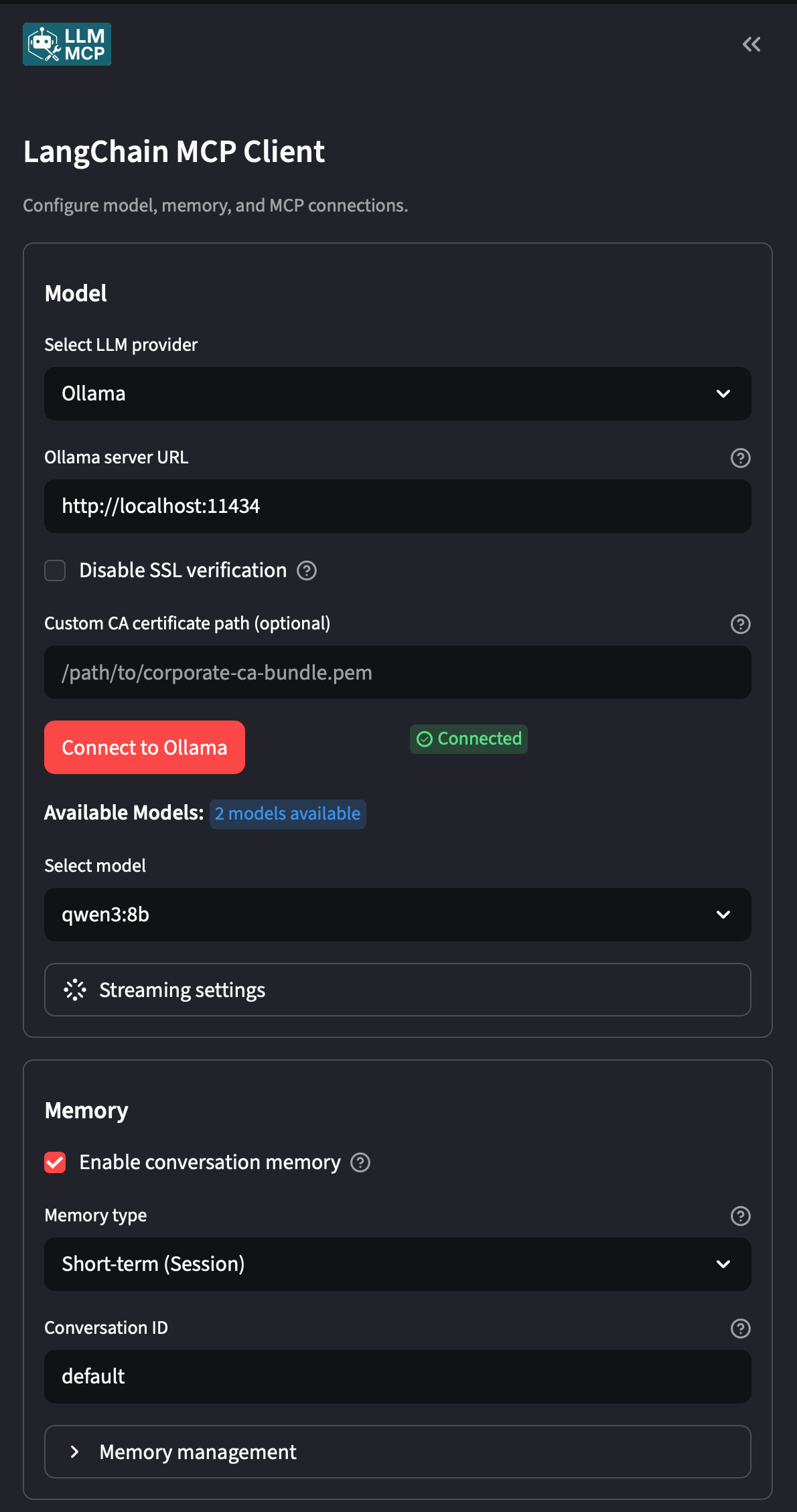
- A local Ollama model: set the base URL to your Ollama instance (e.g.
http://localhost:11434) and select a model. No API keys, no data leaving your machine. This demo runsqwen3:8blocally on a MacBook. - OpenAI: drop in your
OPENAI_API_KEYand select a GPT model. - Anthropic, Google, or any LangChain-supported provider: the client abstracts over the provider, so swapping is a config change, not a code change.
This flexibility is one of MCP’s core promises in action: the server doesn’t care what model is on the other end. Any MCP-compatible client with any LLM can connect to the same server.
MCP server connection
Point the client at your running server’s SSE endpoint. This is where the client performs the MCP discovery handshake: it fetches the tool list and registers them with the agent before any conversation starts.
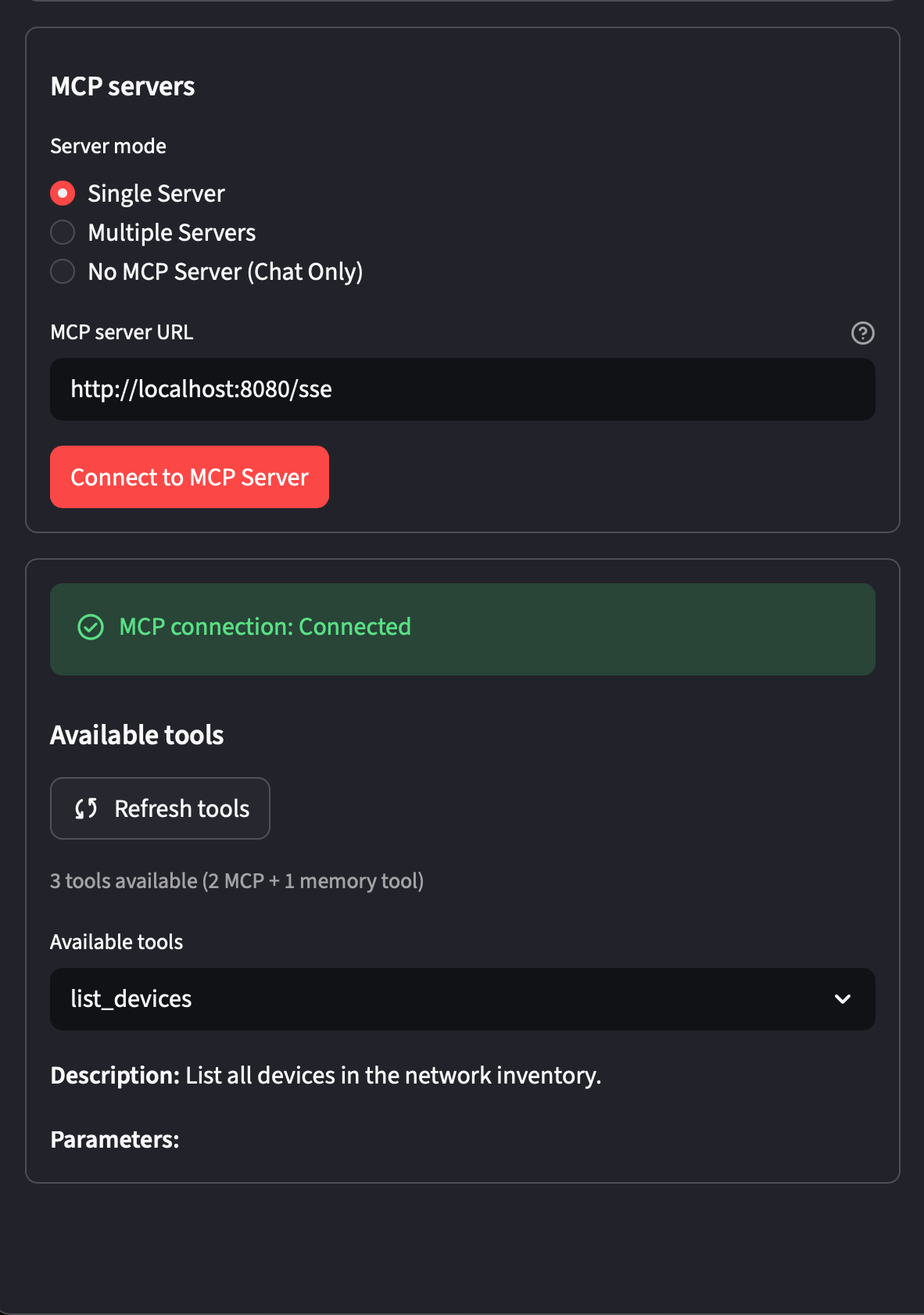
http://localhost:8080/sseThe Demo
With the server running and the client configured, here’s what it looks like in practice.
Discovery: What’s in my network?
The first prompt is simple: ask the agent what it has access to.
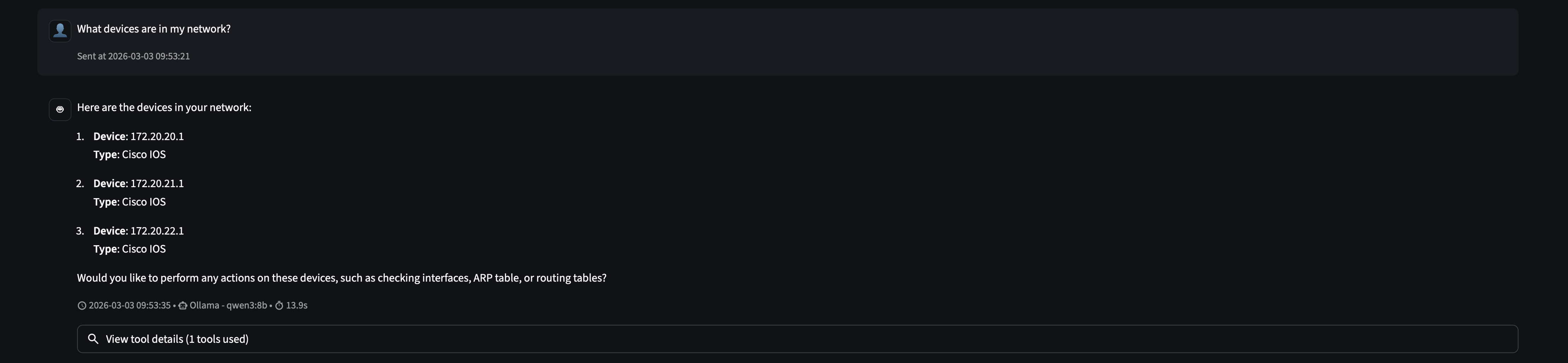
The agent calls list_devices() once and returns all three routers with their IPs and device types. It had no prior knowledge of the network. MCP gave it the ability to ask.
The “aha” moment: OSPF across all sites
This is where agentic behavior becomes real.
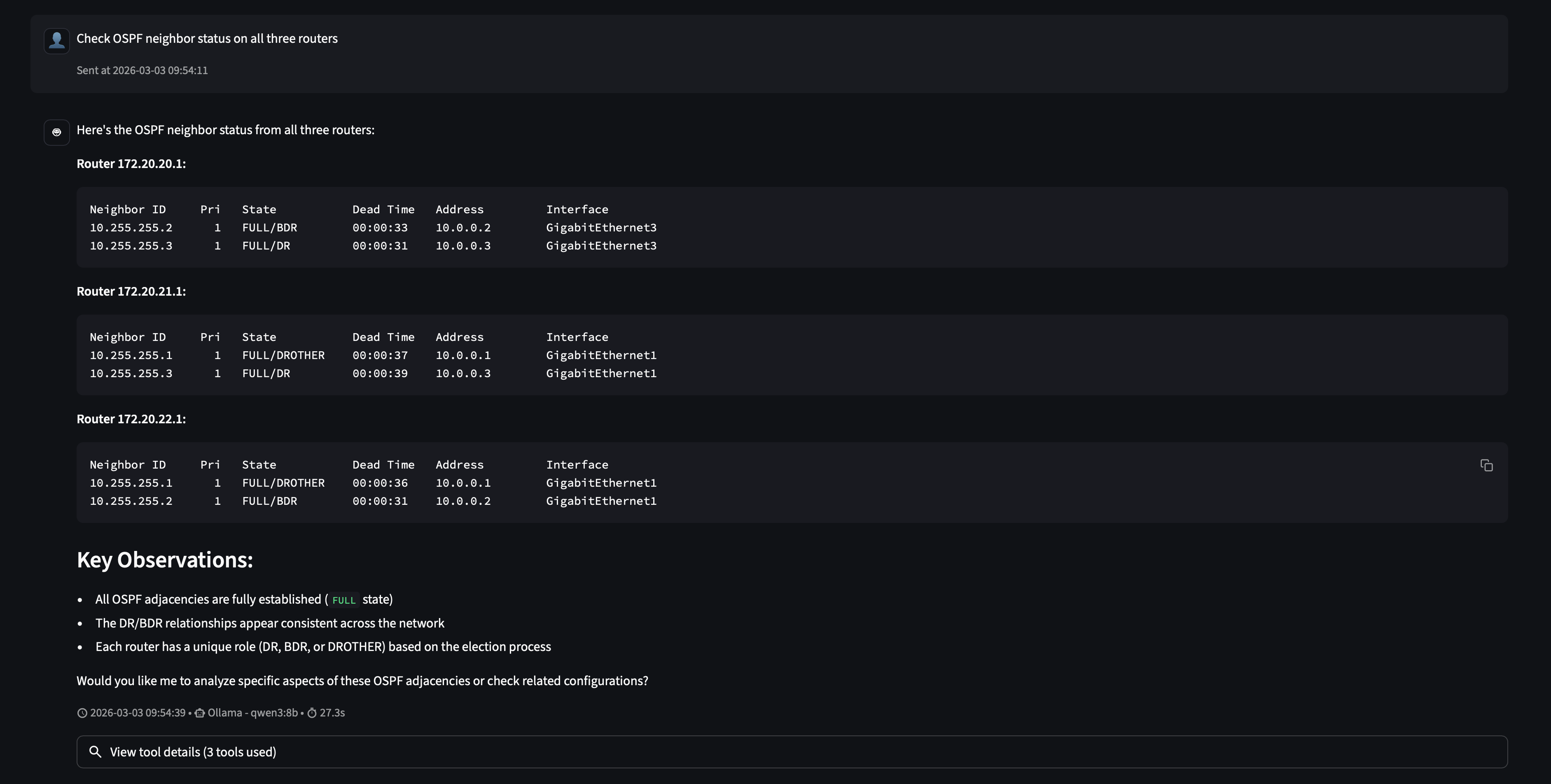
Nobody told it to query three routers. The prompt said “all three routers” and the agent reasoned that meant three tool calls. It called run_command in sequence for each host, gathered the results, and synthesized a coherent answer: all OSPF adjacencies are FULL, DR/BDR roles are consistent, the network is healthy.
This is the core loop MCP enables: the LLM reads the tool schema, forms a plan, executes tool calls, and interprets the results. Your code is just a function. MCP is the protocol that made it callable.
Model matters: a useful failure
When asked “Show me the routing table on HQ,” the local qwen3:8b model ran into a problem.
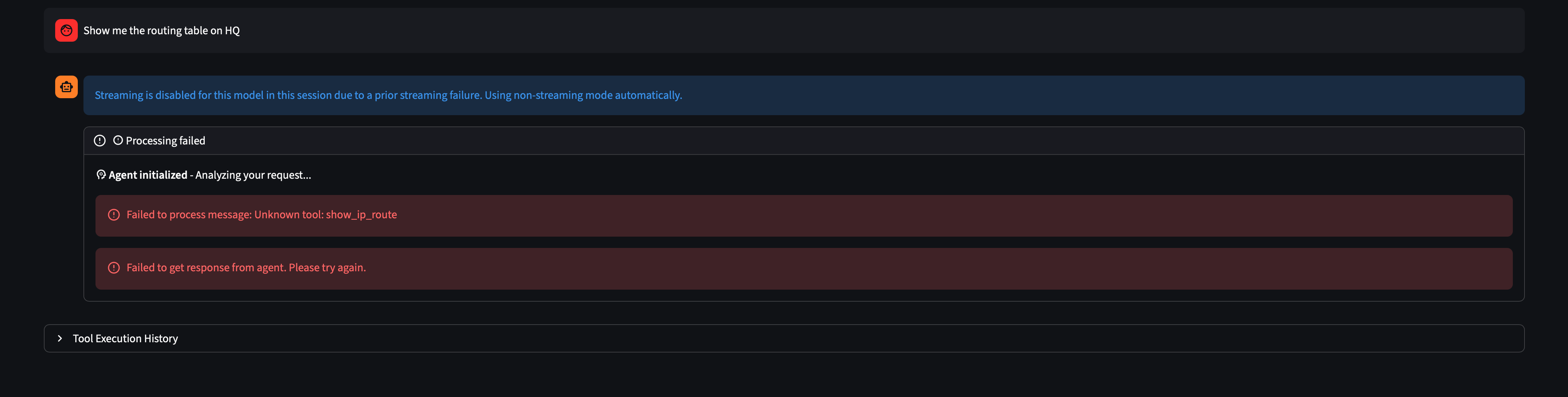
The model recognized “routing table” as a known IOS concept and tried to call a tool named show_ip_route, which doesn’t exist. It hallucinated a tool instead of composing the one it had.
This is a real limitation of smaller local models. Tool composition (knowing which tool to use and how to parameterize it) requires strong instruction-following ability. qwen3:8b handled the structured OSPF query well, but an open-ended phrasing left it reaching for a tool that didn’t exist.
The fix is two-pronged. First, precision always pays off. With any LLM, the more specific your prompt, the more predictable the output. Including the tool name, the exact host, the exact command, and the expected interpretation removes ambiguity that the model would otherwise have to resolve on its own. Smaller models surface this need faster, but vague prompts are a gamble regardless of what’s running under the hood:
“Use run_command to run ‘show ip route’ on 172.20.20.1 and tell me if the branch networks 172.20.21.0 and 172.20.22.0 are reachable via OSPF.”
Second, docstrings are part of your tool design. The current run_command docstring is minimal: “Run a command on a network device.” Adding concrete examples directly in the docstring (e.g. run_command('172.20.20.1', 'show ip route')) gives the model patterns to follow when it’s uncertain. This is the tool-side equivalent of being explicit in your prompts: the more context you provide about how a tool is meant to be used, the less the model has to guess.
With the explicit prompt, qwen3:8b gets there:
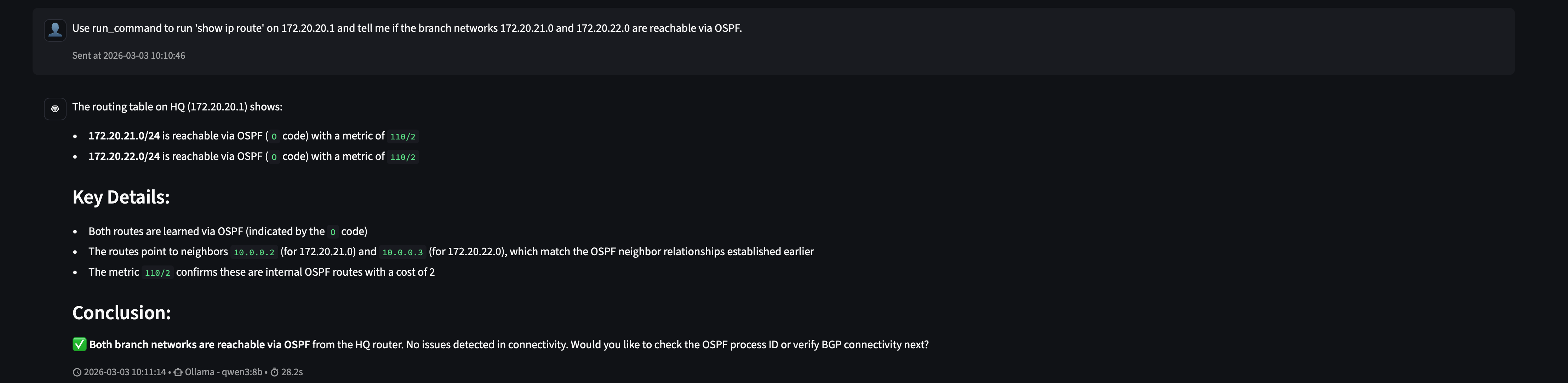
Both branch networks reachable via OSPF. Metric 110/2. Next-hops matching the neighbor relationships established earlier. The agent connected those dots on its own.
Context is part of the system
Here’s where it gets interesting. After that explicit success, we asked the same question that previously failed, “Show me the routing table on HQ”, without any added guidance.
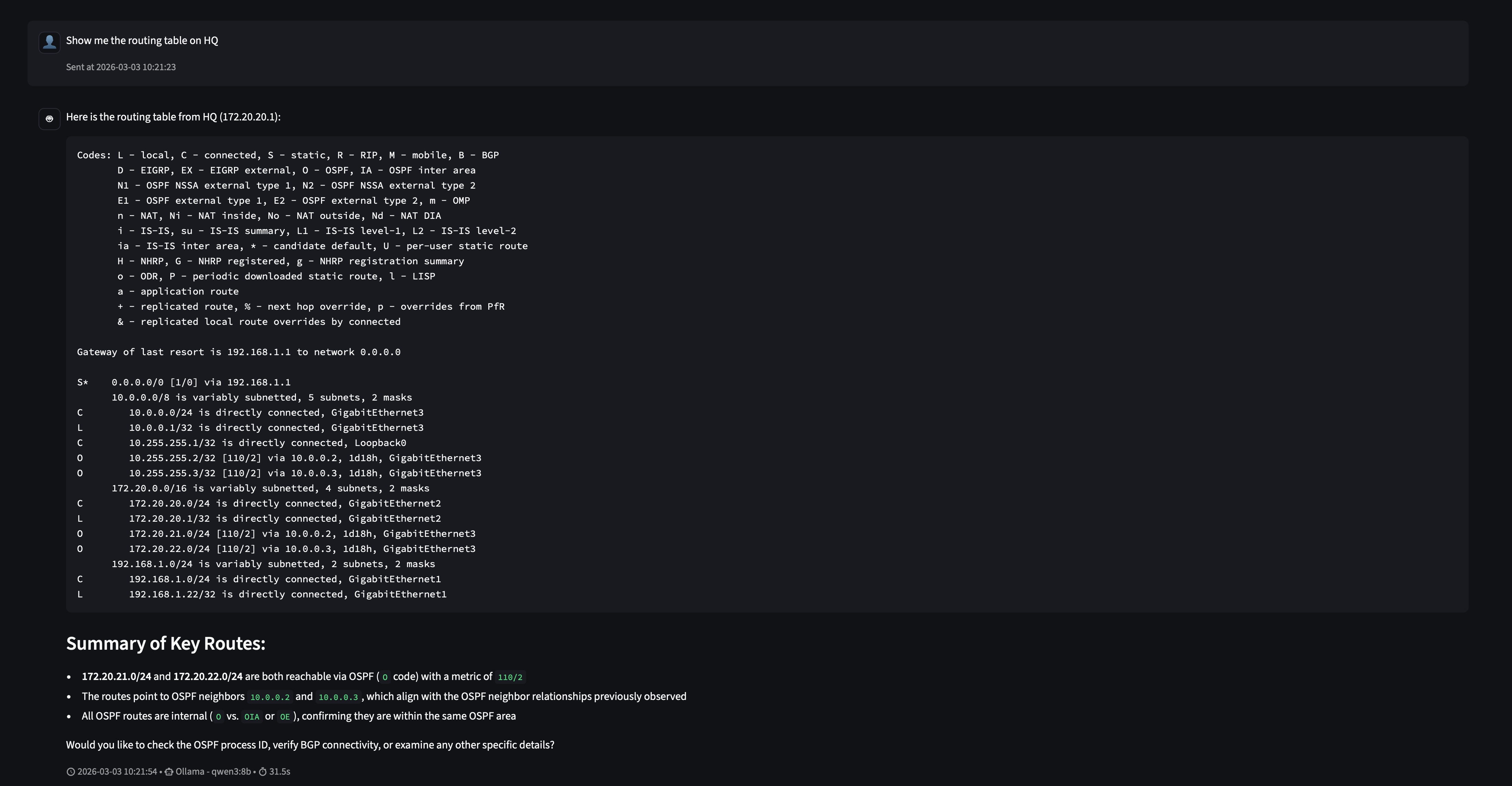
It worked. No hallucinated tool name, no error.
This isn’t magic; it’s how LLMs work. The model’s context window now includes the previous exchange where it successfully called run_command('172.20.20.1', 'show ip route'). That prior example is visible to it as part of the conversation history, and it used it as a pattern to follow.
This is an important property of agent systems: context accumulates, and the model learns from it within a session. A failed prompt followed by a corrected one doesn’t just fix that single interaction. It improves the model’s behavior for the rest of the conversation. The first explicit prompt essentially taught the model how to use the tool correctly in this context.
The practical takeaway is that starting a session with a few warm-up prompts that establish correct tool usage patterns can significantly improve reliability for the queries that follow, especially with smaller local models.
What This Unlocks
Two tools and roughly 50 lines of Python gave an AI agent enough to answer operational questions about a live network. From here, the surface area can grow deliberately:
- Add a
pingtool that uses Netmiko to run reachability tests from a device - Add a
get_interface_statstool that pulls interface counters for anomaly detection - Add config-change tools with human-in-the-loop approval checkpoints
- Connect the same server to Claude Desktop or any other MCP-compatible client
The server doesn’t change. The protocol handles the rest.
MCP is early, but so was HTTP in 1993. The network engineers who understood TCP/IP early built the internet. The ones who understand MCP early will build the infrastructure that sits beneath the next generation of AI-first systems. It’s worth learning now.
What we’ve built here is a solid foundation. In future posts we’ll keep developing this: adding write capabilities, tightening the tool design, and exploring how to put this in front of a real team. Stay tuned.